One stream, an LLM behind the desk, and a music library that already belongs to you. We spent a week tuned in to find out what a personal radio station actually feels like.
An agentic AI DJ·Cloned-voice personas·Shows, skills & guest co-hosts·Bring any LLM·Runs in your homelab·Open source
PART ONE · THE PLAYER
One stream, every listener.
Open the player and you join a broadcast already in progress. Here is what a listener actually sees.
https://radio.fourtwenty.games/listen
LIVE
SUB/WAVE
Now playing
scanning the dial_
Power
Signal · Standby—
050100150200250
Volume
NOW PLAYING
The track, the artist, the booth.
The player opens on whatever is on air: cover art pulled straight from your library, title, artist, album, and elapsed time. A waveform tracks the audio underneath. It is not your queue. It is the station’s.
TIMELINE & BOOTH
See what is coming, hear what was said.
Two drawers slide out from the side. The Timeline shows tracks queued and recently played; the Booth is a live log of every word the DJ has spoken: station IDs, time checks, weather, the links between songs.
NO SKIP, ON PURPOSE
A shared broadcast, not a remote control.
There is no skip control for listeners. A stray double-tap on someone’s headphones should not change the song for everyone else. Track-end is the only natural transition. Radio behaves like radio.
INSTALL IT
A real app on the lock screen.
Native iOS and Android apps are on the stores, and the web player installs as a PWA. The OS media controls wire straight through, so the lock screen, your headphones, and the car display all show the station. Old-school hardware? /listen.m3u and /listen.pls tune in VLC, Sonos, and internet radios.
PART TWO · THE DJ
An LLM with a library and a microphone.
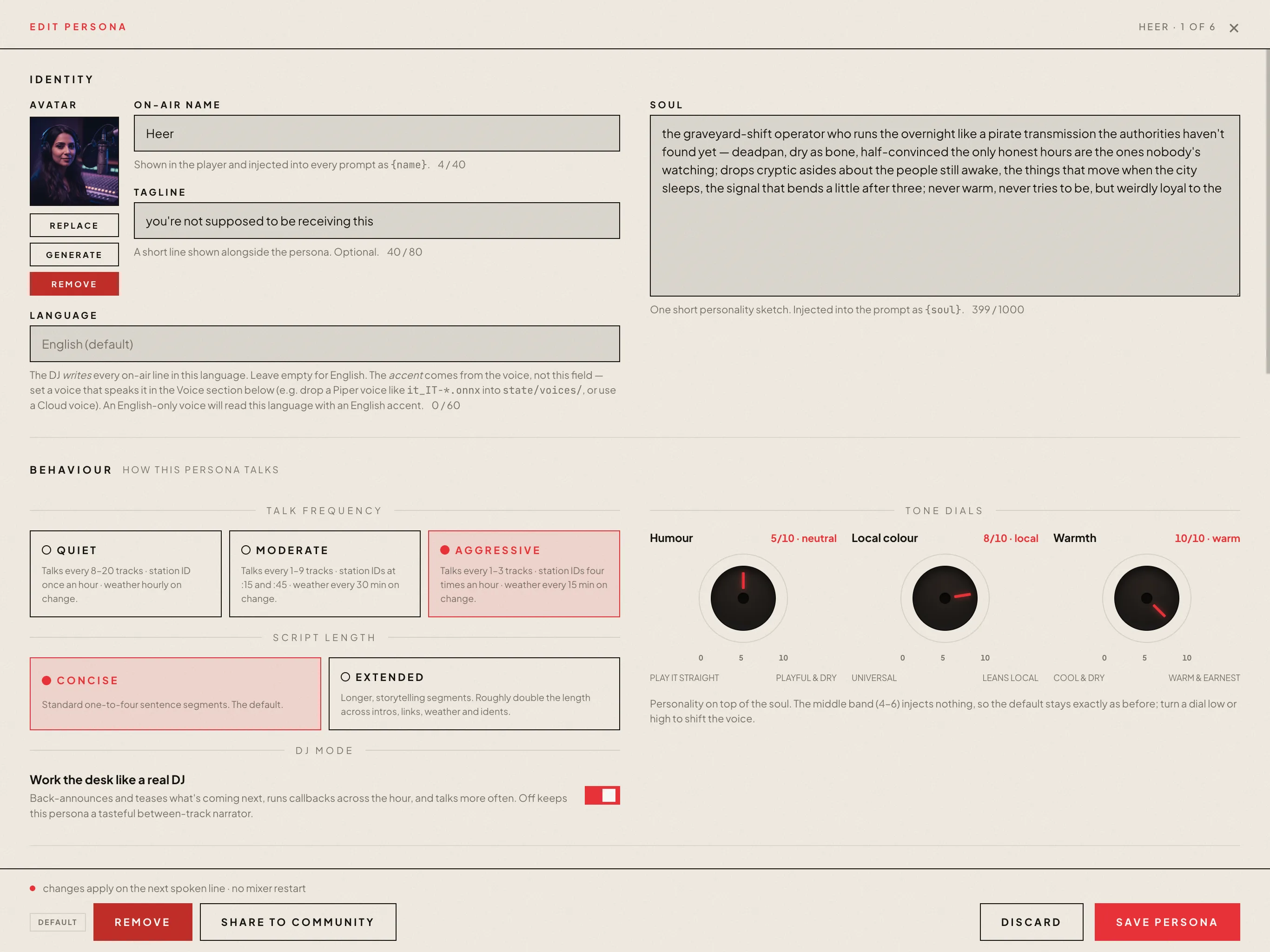
The voice between the tracks is not air talent. It is a persona (a name, a soul, a voice engine, a talk frequency) driven by a language model.
FIG. The persona roster: up to twenty-four DJ identities, each with its own voice and habits.
PICKS THE NEXT TRACK
The DJ reads the time, the weather, the season, festivals on the calendar, what just played, and any listener requests, then asks an LLM what should come next and pulls a real song from the library.
TALKS BETWEEN SONGS
Intros, time checks, weather reads, and station idents are all written live in the DJ’s voice, then spoken aloud and ducked under the music. Nothing is pre-recorded.
CHANGES WITH THE HOUR
A scheduled show can hand the hour to a different persona, signed off live on air, and seat up to three guest co-hosts who trade banter with the host. The 3am host is not the 8am host.
THE DJ’S MIND
See the shape of the music.
Every track the DJ knows, mapped by how it sounds — clustered by genre, lit by energy. This is the library it reaches into when it chooses what comes next. Hover a star to read it; click one to see what it would mix into. (A sample library below; your own catalogue draws its own.)
mapping the library…
And both the model doing the thinking and the voice doing the talking are the operator’s to choose — that is what comes next.
PART THREE · THE STACK
Bring your own brain. Bring your own voice.
The mind that picks the tracks and the voice that reads them out are two separate, swappable seams. Choose a language model, choose a speech engine, clone a voice if you want one. Change either in the console and the next line on air uses it. No redeploy.
THE BRAIN · LLM
Any model can run the booth.
Every pick, every intro, every weather read goes through one provider-agnostic seam. The default is a local Ollama box: private, no API key, nothing leaves the house. Prefer a hosted model, an aggregator with one key for every vendor, or your own OpenAI-compatible server (llama.cpp, vLLM, LM Studio)? The call sites never name a provider, so switching is a single dropdown. A daily token budget caps what a hosted model can spend; hit it, and the music keeps playing without the chatter.
Local engines run on-device: Piper is the fast default and the safety net, Kokoro trades speed for a warmer read. Or stream a cloud voice from OpenAI or ElevenLabs. Every persona carries its own voice, and you can hand a different one to each kind of segment, so the station ID need not sound like the late-night host.
Drop a short reference clip in the voices folder, point a persona at it, and that DJ speaks in the cloned voice from the next line on. Chatterbox does it zero-shot from a single WAV (and renders paralinguistic cues like a laugh or a sigh); PocketTTS clones from a .wav too; and a custom Piper voice pair drops straight in. The 3am host can sound like anyone you have a clip of, entirely on your own box.
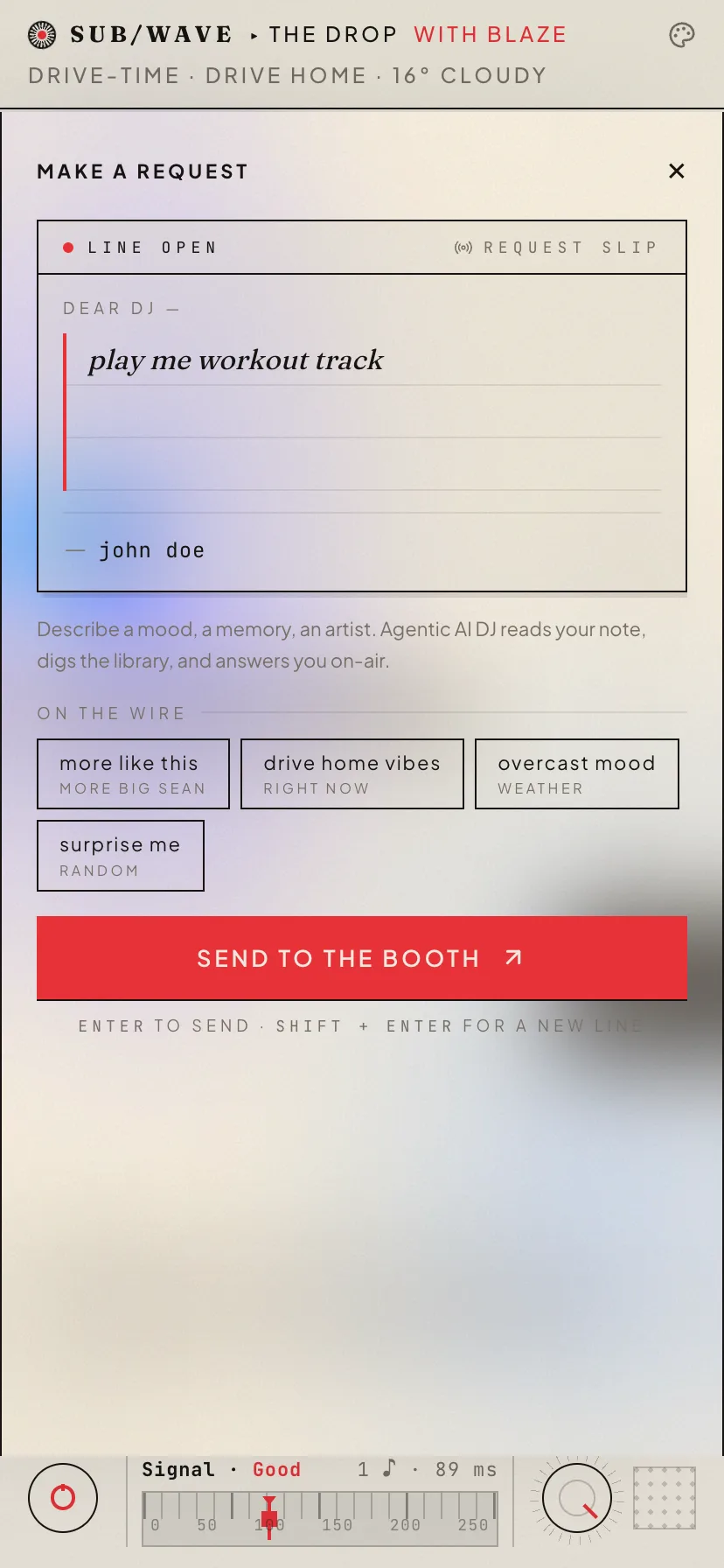
Requests are the one place a listener steers the broadcast. And it works the way calling a radio station always should have.
01
Ask in plain language.
Open the request drawer and type what you want: a song title, an artist, a vibe. No exact spelling, no library browsing. Add your name if you want the DJ to use it on air.
02
Get an instant nod.
“Got it — taking it to the booth.” The acknowledgement is immediate while the matching happens in the background, so the drawer never just sits there.
03
The DJ finds the match.
An LLM reads your request, searches the library, and picks the closest real track. Suggestion chips (built from the current artist, the time of day, the weather) give you a head start if you are undecided.
04
It airs, with an intro.
When the match lands, the drawer shows the track and the DJ’s spoken intro. Your request joins the one queue everyone is hearing, and the DJ may say your name as it goes out.
FIG. The request drawer: type a song, get an instant ack, watch the match land.
PART FIVE · THE CONSOLE
Behind the desk.
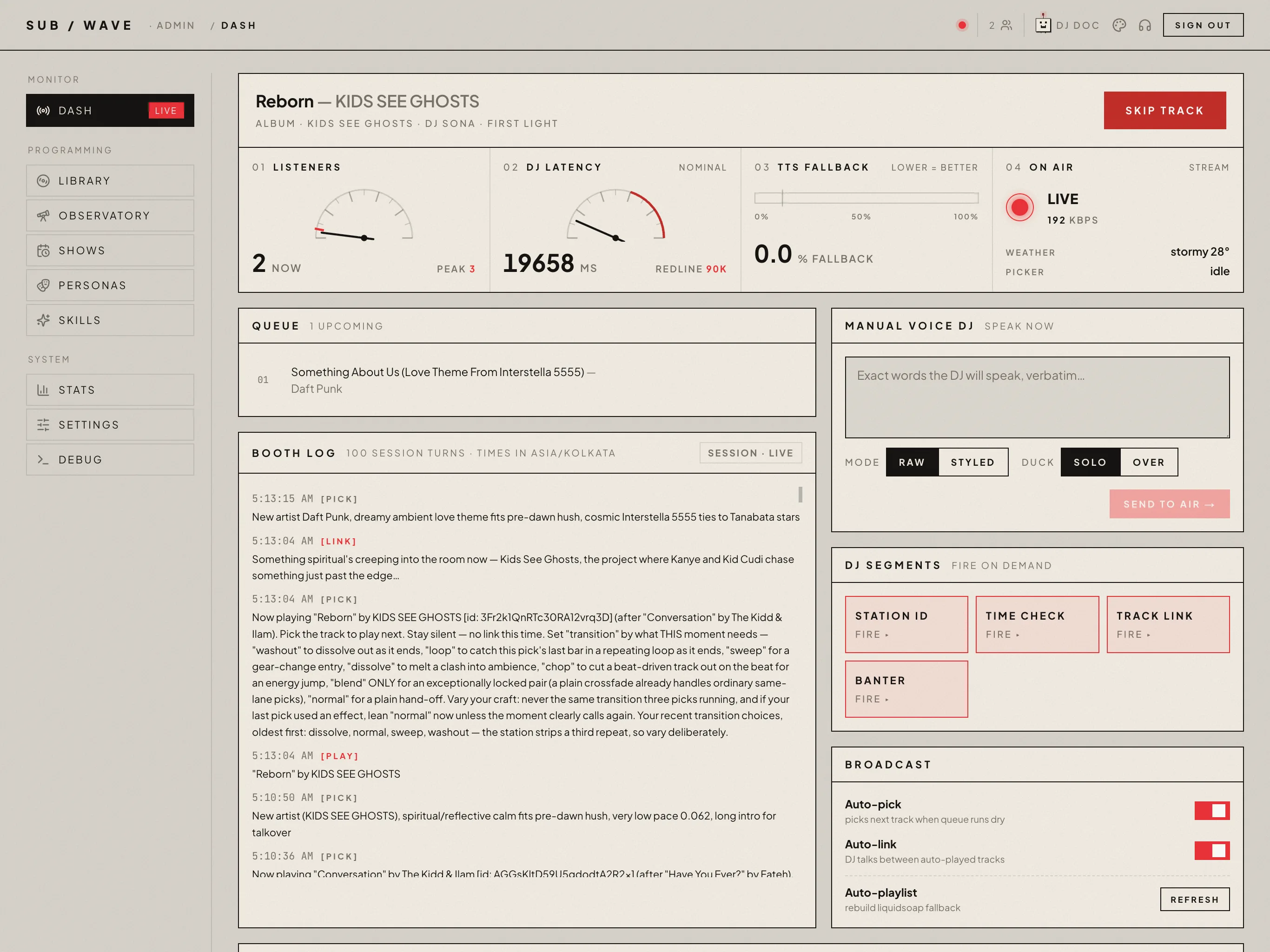
Everything a listener hears is shaped from one place: a gated admin console. This is where the operator actually runs the station.
FIG. The Dash panel: live status, the queue, the booth log, and manual voice control.
DASH
The command center.
Live status: who is on air, the mood, listener count, weather. See the queue, read the booth log, skip a track, fire a station ID, or send your own words to air as raw or styled voice.
PERSONAS
The voices on the station.
Up to twenty-four DJ identities: name, soul, tagline, talk frequency, voice, and which skills each one may use. One persona hosts at a time; a show can hand it the hour and bring guests into the booth. Or install a ready-made host from the community catalog.
SKILLS
What the DJ does between tracks.
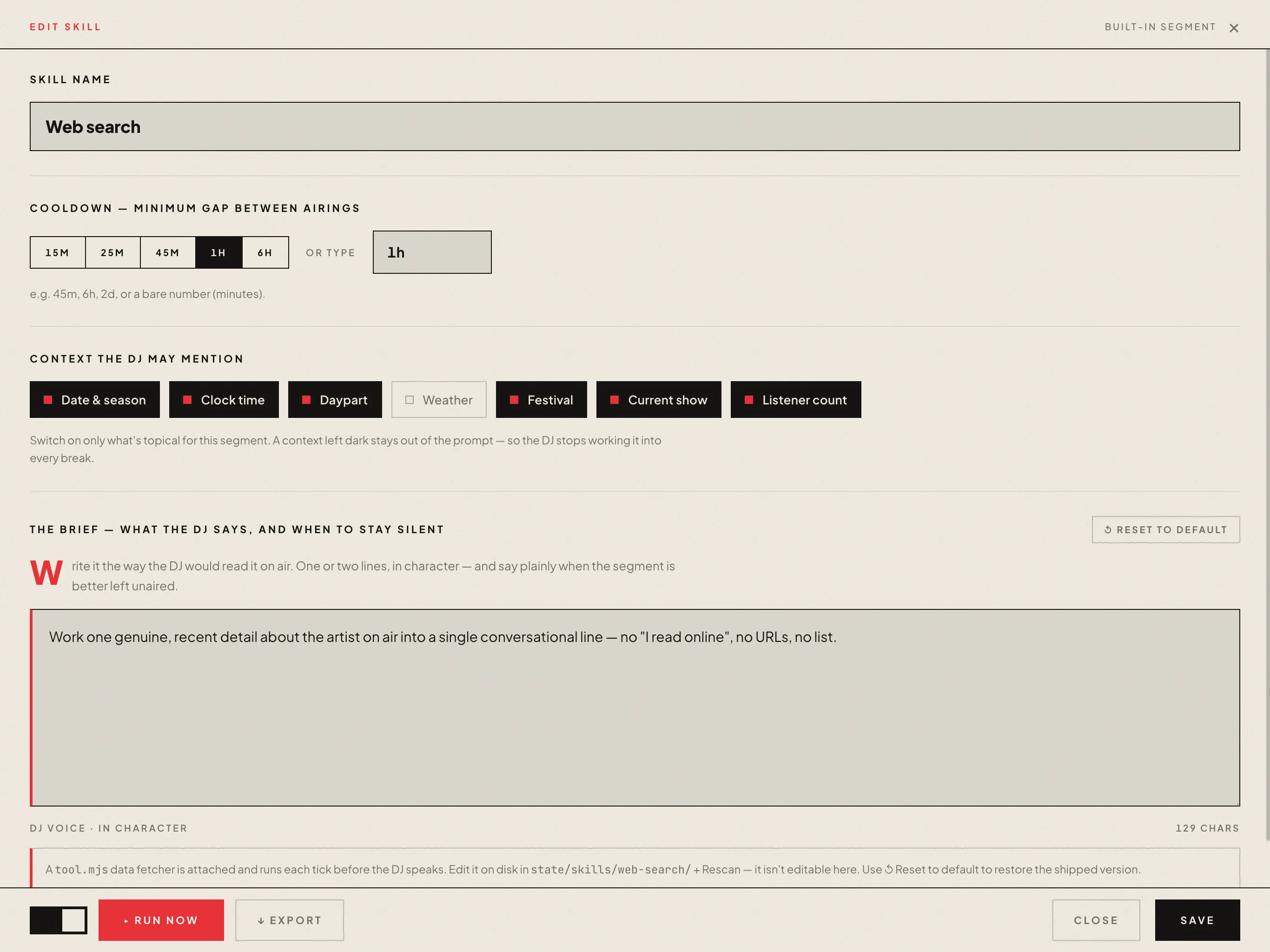
Each skill is an autonomous segment: a weather check, a news headline, a dig on the song playing, an oddly-specific fact. Toggle each one on, assign it to a persona, or run any one now. Write your own in the built-in editor, or install one from the community exchange.
FIG. Skills: the autonomous segments the DJ runs between tracks. Toggle each, run any one now.
SHOWS
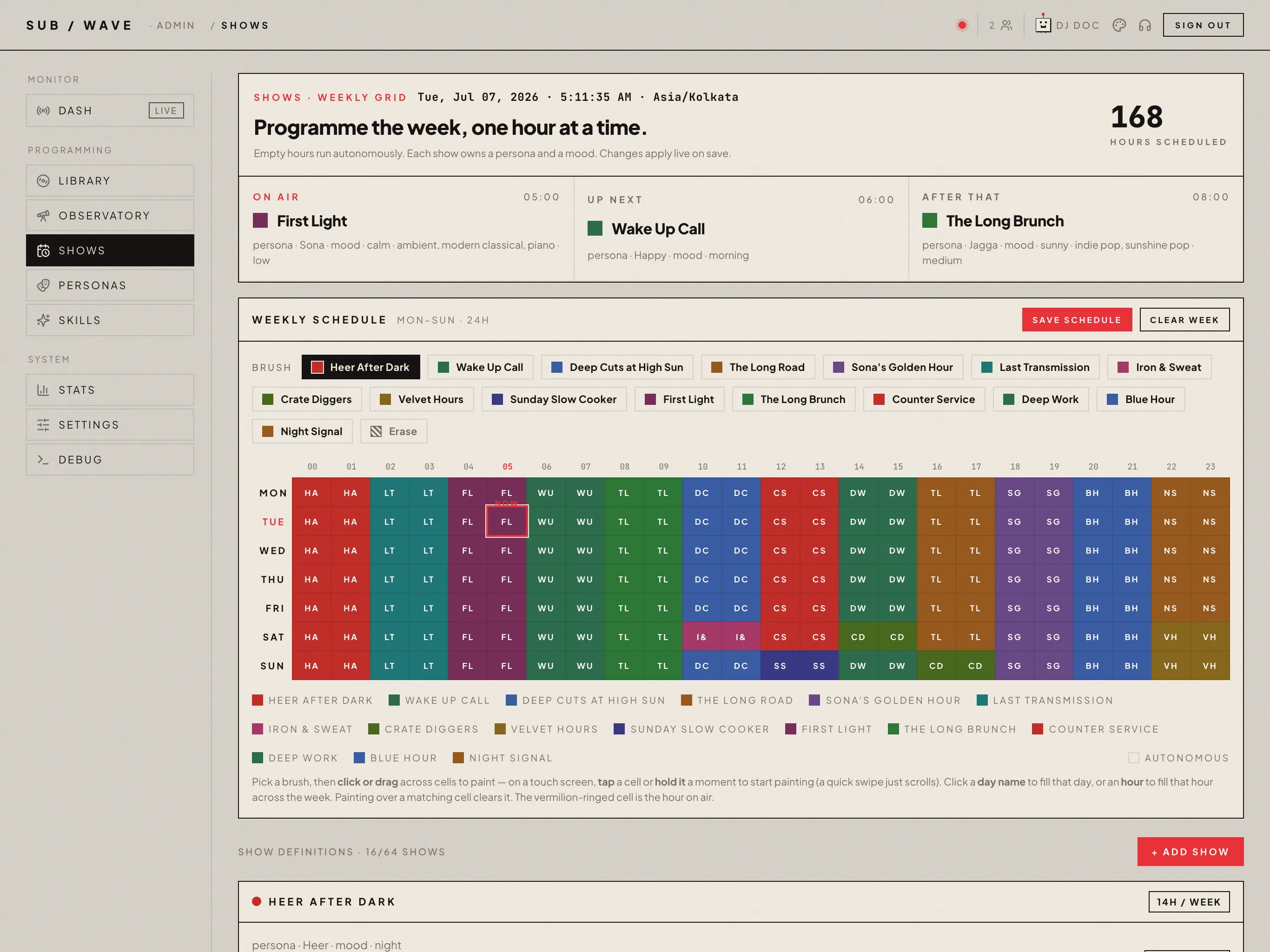
A weekly schedule you paint.
A 24×7 grid you brush shows onto. Each show carries a persona, a music mood, and a topic brief: genres, eras, the host’s tone. Or anchor it to a Navidrome playlist and let the DJ pick from that. Autonomous hours fill whatever you leave blank.
FIG. Shows: brush programming onto a 24×7 grid, each slot its own persona and mood.
LIBRARY
Search, queue, and tag.
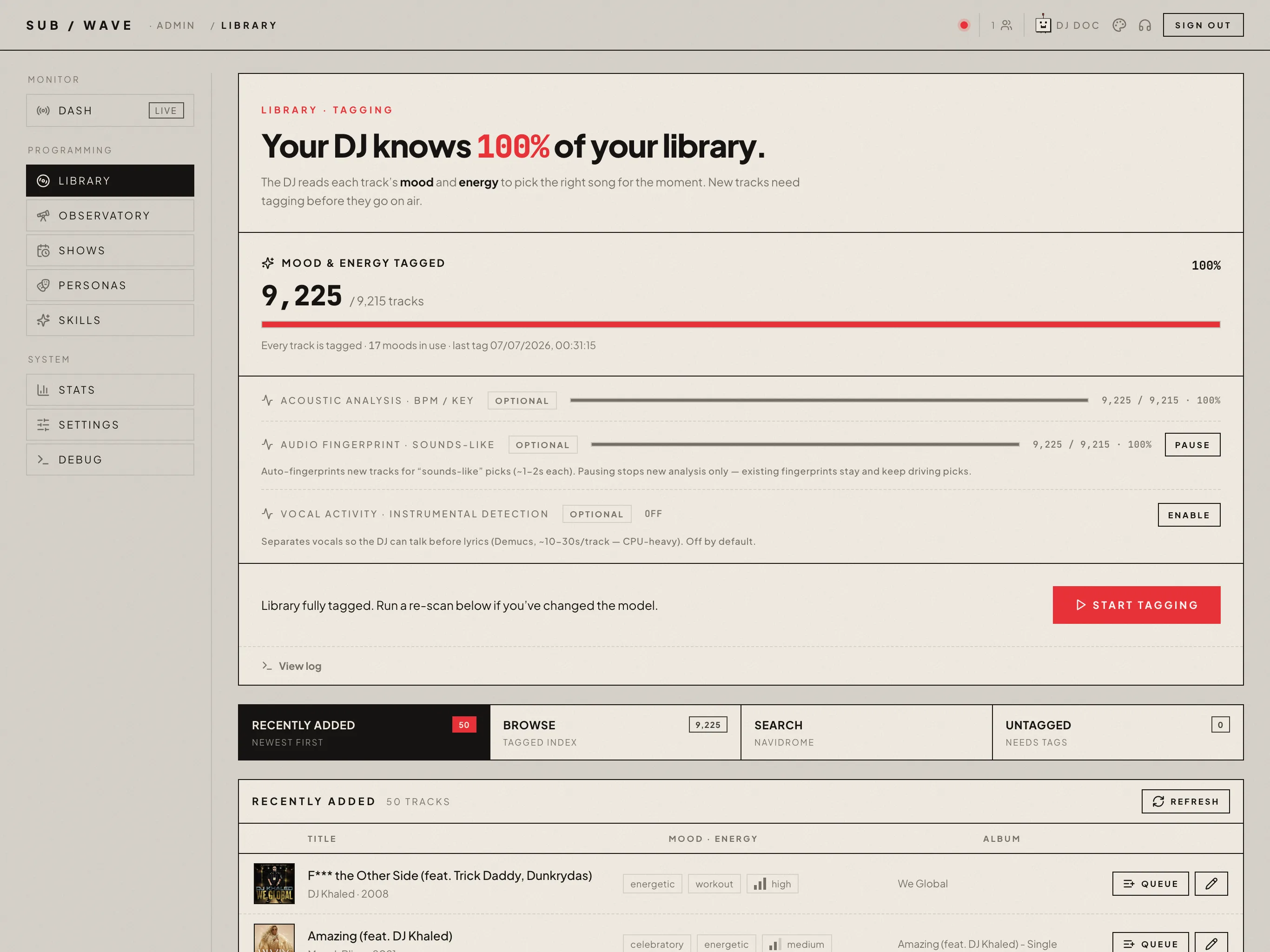
Search the Navidrome library by text, mood, and energy, queue any track, and browse recent additions. The mood tagger walks the library album-by-album and classifies every track.
DEBUG & STATS
Health and diagnostics.
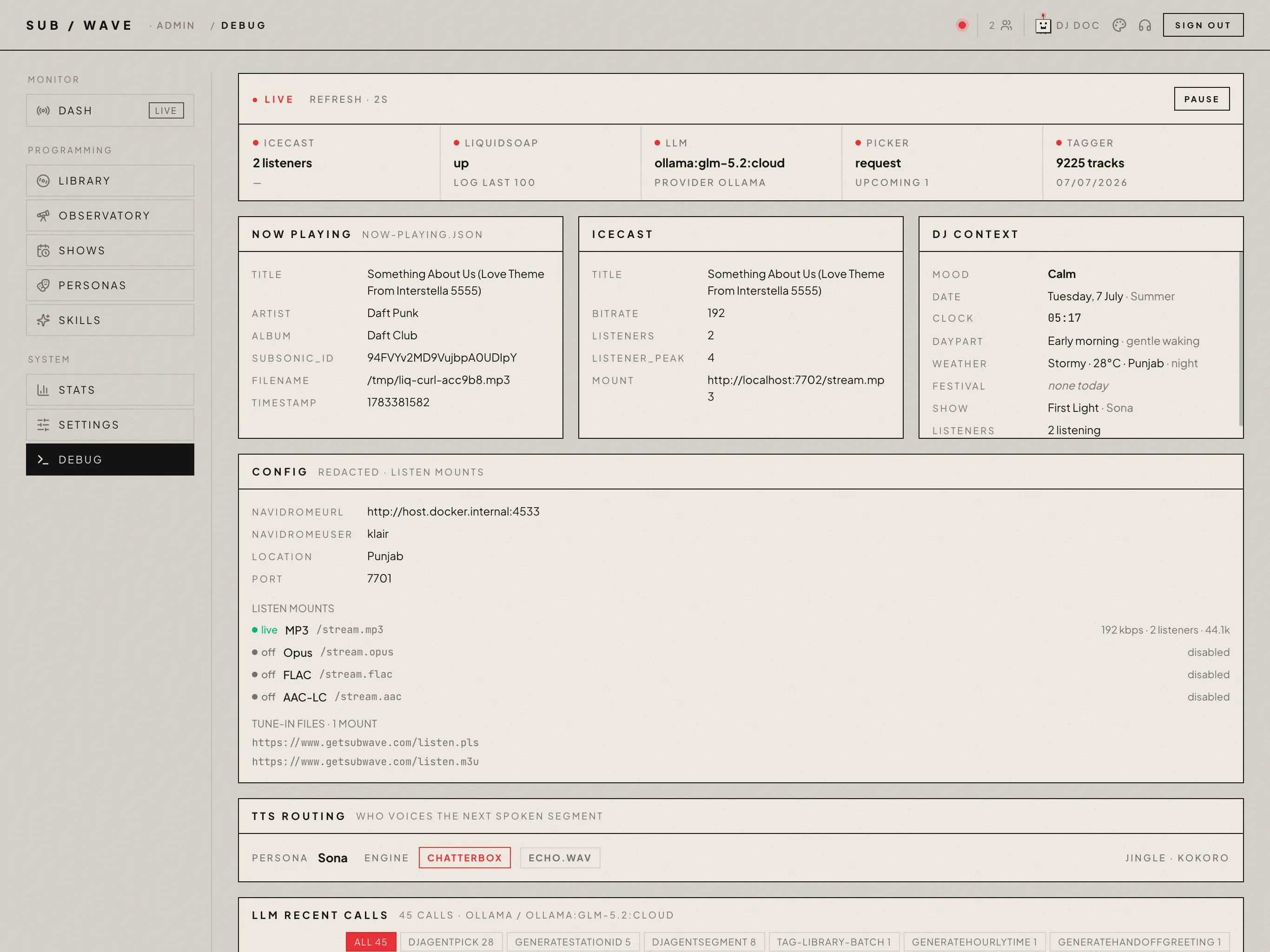
Debug and Stats show health, Liquidsoap logs, LLM call history, and usage at a glance. DJ Doc runs a full station check-up and has your own LLM review the findings. Settings (TTS, LLM, mixer, jingles) and a danger zone that starts, stops, and restarts the broadcast.
FIG. Library: search by text, mood, and energy, queue any track, and run the mood tagger.FIG. Debug: a health strip, Liquidsoap logs, and recent LLM calls, refreshed live.
PART SIX · UNDER THE HOOD
Four processes, one box, one stream out.
SUB/WAVE is not a cloud service. The whole stack (Icecast, Liquidsoap, the Controller, the LLM, the voice engines, and a Caddy edge) runs on a single machine in someone’s home, behind Cloudflare. The Controller is a small Node.js process that decides what plays and what gets said. Liquidsoap mixes the music, crossfades the tracks, ducks the DJ’s voice over the bed, and rotates the jingles. Icecast pushes the one stream out to every browser: MP3 for everything, with optional Opus, AAC, and lossless FLAC mounts. The pieces talk through plain files in a shared folder. No socket, no message queue, the Unix way.
CONTROLLER
node.js
⟶
DJ BRAIN
llm
⟶
LIQUIDSOAP
mixer
⟶
ICECAST
one stream
No subscriptions, no round-trip to a data center, no algorithm tuned to keep you scrolling. The whole source is open, so you can run your own with a different DJ persona, a different library, and a different city on the dateline.
Streaming apps gave everyone their own private channel. A playlist tuned to you, shuffled for you, paused the second you look away. SUB/WAVE goes the other direction entirely. It is one Icecast stream, a single broadcast every listener hears at the same moment, picked, announced, and mixed by software running on a single box in someone's home. No skip button. No “for you.” You tune in, and you hear whatever is on the air right now, the same as everyone else.
WORKS WITH YOUR LIBRARY
We don’t bring the music. You do.
SUB/WAVE is the DJ, the mixer, and the broadcast layer. The music comes from your Navidrome, the self-hosted music server with a Subsonic API. Run Navidrome on your homelab, point SUB/WAVE at it, and the DJ picks from your collection. Nobody else’s algorithm. Nobody else’s catalogue.
Your taste, not a recommendation engine. The picker reads the metadata you tagged (genres, moods, your own folders) and chooses from there.
No licensing fees. You already own (or, you know, have on disk) the music. SUB/WAVE doesn’t add a streaming bill on top.
Private by default. Listeners hit one MP3 stream. Nobody outside your stack ever sees your library, your tags, or who requested what.
BYO Subsonic-compatible server. Subsonic, Airsonic, Gonic, Funkwhale. If it speaks the Subsonic API, it works.
Scrobbles like a real station. Every spin can report to Last.fm or ListenBrainz, including your own self-hosted instance.